requests.post() 方法的使用:
post方法简单使用
1、带数据的post
2、带header的post
3、带json的post
4、带参数的post
5、普通文件上传
6、定制化文件上传
1、常用返回信息:
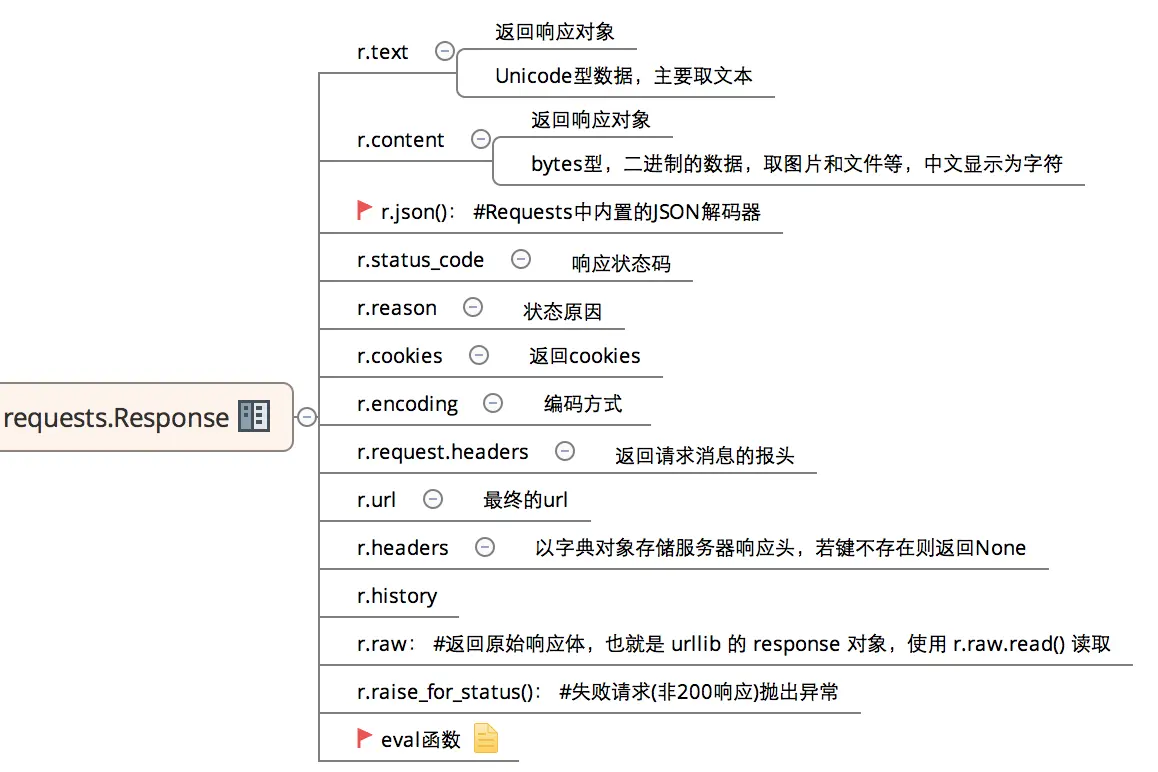
二、post方法简单使用:
1、带数据的post:
1
2
3
4
5
6
7
8
9
10
11
12
13
|
# -*- coding:utf-8 -*-
import requests
import json

host = "http://httpbin.org/"
endpoint = "post"
url = ''.join([host,endpoint])
data = {'key1':'value1','key2':'value2'}

r = requests.post(url,data=data)
#response = r.json()
print (r.text)
|
输出:
1
2
3
4
5
6
7
8
9
10
11
12
13
14
15
16
17
18
19
20
21
22
23
|
{
  "args": {},
  "data": "",
  "files": {},
  "form": {
    "key1": "value1",
    "key2": "value2"
  },
  "headers": {
    "Accept": "*/*",
    "Accept-Encoding": "gzip, deflate",
    "Connection": "close",
    "Content-Length": "23",
    "Content-Type": "application/x-www-form-urlencoded",
    "Host": "httpbin.org",
    "User-Agent": "python-requests/2.18.1"
  },
  "json": null,
  "origin": "183.14.133.88",
  "url": "http://httpbin.org/post"
}
|
2、带header的post:
1
2
3
4
5
6
7
8
9
10
11
12
13
14
|
import requests
import json
host = "http://httpbin.org/"
endpoint = "post"
url = ''.join([host,endpoint])
headers = {"User-Agent":"test request headers"}
r = requests.post(url,headers=headers)
|
输出:
1
2
3
4
5
6
7
8
9
10
11
12
13
14
15
16
17
| {
"args": {},
"data": "",
"files": {},
"form": {},
"headers": {
"Accept": "*/*",
"Accept-Encoding": "gzip, deflate",
"Connection": "close",
"Content-Length": "0",
"Host": "httpbin.org",
"User-Agent": "test request headers"
},
"json": null,
"origin": "183.14.133.88",
"url": "http://httpbin.org/post"
}
|
3、带json的post:
1
2
3
4
5
6
7
8
9
10
11
12
13
14
15
16
17
18
19
|
import requests
import json
host = "http://httpbin.org/"
endpoint = "post"
url = ''.join([host,endpoint])
data = {
"sites": [
{ "name":"test" , "url":"www.test.com" },
{ "name":"google" , "url":"www.google.com" },
{ "name":"weibo" , "url":"www.weibo.com" }
]
}
r = requests.post(url,json=data)
response = r.json()
|
输出:
1
2
3
4
5
6
7
8
9
10
11
12
13
14
15
16
17
18
19
20
21
22
23
24
25
26
27
28
29
30
31
32
33
| {
"args": {},
"data": "{\"sites\": [{\"url\": \"www.test.com\", \"name\": \"test\"}, {\"url\": \"www.google.com\", \"name\": \"google\"}, {\"url\": \"www.weibo.com\", \"name\": \"weibo\"}]}",
"files": {},
"form": {},
"headers": {
"Accept": "*/*",
"Accept-Encoding": "gzip, deflate",
"Connection": "close",
"Content-Length": "140",
"Content-Type": "application/json",
"Host": "httpbin.org",
"User-Agent": "python-requests/2.18.1"
},
"json": {
"sites": [
{
"name": "test",
"url": "www.test.com"
},
{
"name": "google",
"url": "www.google.com"
},
{
"name": "weibo",
"url": "www.weibo.com"
}
]
},
"origin": "183.14.133.88",
"url": "http://httpbin.org/post"
}
|
4、带参数的post:
1
2
3
4
5
6
7
8
9
10
11
12
13
14
15
16
|
# -*- coding:utf-8 -*-
import requests
import json

host = "http://httpbin.org/"
endpoint = "post"

url = ''.join([host,endpoint])
params = {'key1':'params1','key2':'params2'}

# r = requests.post(url)
r = requests.post(url,params=params)
#response = r.json()
print (r.text)
|
输出:
1
2
3
4
5
6
7
8
9
10
11
12
13
14
15
16
17
18
19
20
21
22
|
{
  "args": {
    "key1": "params1",
    "key2": "params2"
  },
  "data": "",
  "files": {},
  "form": {},
  "headers": {
    "Accept": "*/*",
    "Accept-Encoding": "gzip, deflate",
    "Connection": "close",
    "Content-Length": "0",
    "Host": "httpbin.org",
    "User-Agent": "python-requests/2.18.1"
  },
  "json": null,
  "origin": "183.14.133.88",
  "url": "http://httpbin.org/post?key2=params2&key1=params1"
}
|
5、普通文件上传:
1
2
3
4
5
6
7
8
9
10
11
12
13
14
15
| # -*- coding:utf-8 -*-
import requests
import json
host = "http://httpbin.org/"
endpoint = "post"
url = ''.join([host,endpoint])
#普通上传
files = {
'file':open('test.txt','rb')
}
r = requests.post(url,files=files)
print (r.text)
|
输出:
1
2
3
4
5
6
7
8
9
10
11
12
13
14
15
16
17
18
19
20
21
22
|
{
  "args": {},
  "data": "",
  "files": {
    "file": "hello world!\n"
  },
  "form": {},
  "headers": {
    "Accept": "*/*",
    "Accept-Encoding": "gzip, deflate",
    "Connection": "close",
    "Content-Length": "157",
    "Content-Type": "multipart/form-data; boundary=392865f79bf6431f8a53c9d56c62571e",
    "Host": "httpbin.org",
    "User-Agent": "python-requests/2.18.1"
  },
  "json": null,
  "origin": "183.14.133.88",
  "url": "http://httpbin.org/post"
}
|
6、定制化文件上传:
1
2
3
4
5
6
7
8
9
10
11
12
13
14
15
16
| # -*- coding:utf-8 -*-
import requests
import json
host = "http://httpbin.org/"
endpoint = "post"
url = ''.join([host,endpoint])
#自定义文件名,文件类型、请求头
files = {
'file':('test.png',open('test.png','rb'),'image/png')
}
r = requests.post(url,files=files)
print (r.text)heman793
|
输出比较多,就不帖了。
7、多文件上传:
1
2
3
4
5
6
7
8
9
10
11
12
13
14
15
16
|
import requests
import json
host = "http://httpbin.org/"
endpoint = "post"
url = ''.join([host,endpoint])
files = [
('file1',('test.txt',open('test.txt', 'rb'))),
('file2', ('test.png', open('test.png', 'rb')))
]
r = requests.post(url,files=files)
print (r.text)
|
输出上,太多内容,不帖了。
8、流式上传:
1
2
3
4
5
6
7
8
9
10
11
12
13
14
|
import requests
import json
host = "http://httpbin.org/"
endpoint = "post"
url = ''.join([host,endpoint])
with open( 'test.txt' ) as f:
r = requests.post(url,data = f)
print (r.text)
|
输出:
'''
{
 "args": {},
 "data": "hello world!\n",
 "files": {},
 "form": {},
 "headers": {
   "Accept": "*/*",
   "Accept-Encoding": "gzip, deflate",
   "Connection": "close",
   "Content-Length": "13",
   "Host": "httpbin.org",
   "User-Agent": "python-requests/2.18.1"
 },
 "json": null,
 "origin": "183.14.133.88",
 "url": "http://httpbin.org/post"
}
'''


归根揭底需要分析 Content-Type这个字段